Earthwork estimates affect a project’s bid, budget, schedule, and profit. A missed quantity or incorrect calculation can create problems before work begins. For San Diego contractors handling excavation, grading, site development, and civil construction, the right software can make takeoffs easier to review and estimates more consistent.
But choosing earthwork estimating software takes more than comparing feature lists. Contractors should check how a program handles their plans, calculates quantities, presents results, and fits the team’s workflow. This guide explains what to consider when comparing excavation software and earthwork tools for projects in San Diego.
What does earthwork estimating software do
Earthwork software helps contractors measure site plans and calculate quantities needed for estimating. Depending on the product and the project, this may include excavation areas, cut and fill volumes, grading quantities, or material requirements.
An earthwork takeoff software workflow typically begins with importing a plan, setting its scale, measuring relevant areas, and reviewing the resulting quantities. Some earthwork estimating programs also provide visual reports to help estimators check and communicate their work.
This software can support bid preparation, project planning, and quantity reviews. However, it does not replace checking the plans, assumptions, and scope. Estimators still need to confirm they are working from the current drawings and that the measurements reflect the project requirements.
Start with the projects your team estimates
Before comparing products, list the work your company regularly bids. A small excavation business may want a straightforward dirt takeoff software workflow. A civil contractor may need more detailed grading and sitework calculations. A general contractor may use
construction excavation estimating software to review quantities or compare subcontractor estimates.
Consider whether your projects commonly involve:
- Excavation and grading
- Cut-and-fill calculations
- Land development and site preparation
- Roads, utilities, or civil construction
- Residential or commercial work
- Plan revisions and changing project scopes
Your project mix helps you decide whether a product is suitable. For example, land development software may include capabilities beyond takeoffs, while a focused estimating tool may be a better fit for a contractor who mainly needs to measure quantities and prepare estimates.
Check the takeoff and measurement workflow
A useful excavation takeoff software workflow should make it clear how measurements connect to the plan. Check how you import a drawing, set its scale, mark areas, review calculations, and make corrections.
When comparing software for excavation contractors, ask:
- Can estimators work from the plans they receive?
- Is it easy to see which measurements relate to which parts of the drawing?
- Can the team review and revise quantities?
- Does the software calculate cut and fill?
- Can you produce reports that help explain the estimate?
A sitework takeoff software tool should suit the complexity of your work without making everyday estimating harder. Try the workflow with a real project plan. A short demonstration may show the features, but testing your own drawing can reveal whether your estimators can use them comfortably.
Compare cut-and-fill calculation tools
For many contractors, cut-and-fill quantities are an important part of an estimate. When reviewing cut and fill software, check what information the program needs, how it displays existing and proposed grades, and how your estimator can verify the results.
A cut and fill calculation software tool should make the calculation process understandable. Ask what inputs are required and whether the tool supports the types of grading plans you
commonly receive. For more complex work, test the software with a representative plan rather than relying only on a sample project.
Contractors comparing cut and fill estimating software should also consider the final output. Can the estimator review the quantities? Can the team share the results with project managers or clients? Clear calculations and useful reports can make it easier to discuss estimate assumptions.
Different products may describe their services as Cut and fill estimation software or earthwork calculation software. Compare what each product actually calculates, rather than relying on the name alone.
Review file compatibility before choosing
Contractors receive drawings in different formats. Before choosing construction excavation software, confirm that it supports the specific files your team uses. Ask about PDF plans, CAD drawings, TIFF files, and scanned plans. If your team uses AutoCAD, check which file types and versions are supported.
Also consider drawing quality. A clean digital plan may be easier to use than a scanned or low-resolution image. Find out whether estimators need to adjust the scale or trace information manually, and test those steps during a demo or trial.
Avoid assuming that a product supports every plan type simply because it accepts one file format. File compatibility should be confirmed with the software provider and tested with your own plans.
Look at reporting and visual features
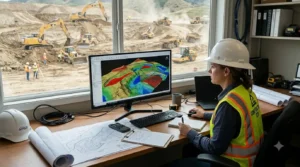
Visual tools can help estimators and project teams review a site’s shape and quantities. If you are comparing sitework takeoff and estimating products, check what their views show and whether those views help with your process.
Ask whether the product provides:
- Quantity summaries
- Cut-and-fill visualizations
- Annotated plans
- Cross-sections or other project views
- Reports that can be shared with your team
EarthWorks’ website describes features such as plan imports, cut-and-fill calculations, 3D visualization, and project reports. Confirm the supported file formats and report outputs directly with the company before relying on them for a specific project. www.excavationsoftware.net
Consider bidding needs and estimating workflow
Some companies need takeoff quantities to support a separate estimating or bidding process. Others want a tool that helps organize more of the estimate. When comparing earthwork bidding software and excavation bidding software, ask what the product handles and what your team will still need to do in other systems.
A takeoff tool can help measure and review quantities, but that does not necessarily mean it creates a complete bid or manages all costs. Check whether your workflow requires labor, equipment, material pricing, proposal documents, or bid tracking. Confirm that the product supports those tasks before treating it as a full bidding solution.
The right excavating contractor software should fit the work your team needs to complete. A focused takeoff tool may be enough for one company, while another may need additional estimating or project management software.
Match the software to your team and budget
The right tool should suit the people who will use it. A small team may prioritize ease of learning and a clear workflow. A larger company may focus on consistent processes across multiple estimators.
When comparing earthwork estimating programs, check:
- How long it takes to learn the core workflow
- Whether training is included
- What customer support is available
- Which computers and operating systems are supported
- What is included in the price
- Whether any extra fees apply
A product that seems affordable may not be the best fit if it takes too long to learn or lacks a capability your team relies on. Ask for a demonstration or free trial, if available, and use a real project plan during the evaluation.
Choose software for San Diego project work
San Diego contractors may estimate excavation, grading, site development, and civil work across different project types. The right site construction software depends on the drawings your team receives, the calculations it needs, and how estimates are reviewed and presented.
A business address in Miramar establishes a local presence, but location alone does not show whether a product fits your workflow. Review the software features, test it with a real plan, and
ask specific questions about support and file compatibility. The same evaluation process can help contractors compare products across San Diego County.
A checklist for comparing excavation software
Before choosing excavation estimating software, use the same checklist for every product:
1. Does it support the plan formats your team uses? 2. Can estimators measure, review, and revise quantities clearly? 3. Does its cut-and-fill workflow suit your projects? 4. Are the available visual features useful to your team? 5. Can you create reports that support your estimating process? 6. What training and customer support are included? 7. What are the system requirements and total costs? 8. Can you test it with a real project plan?
This approach makes it easier to compare earthworks software, excavating contractor software, and focused takeoff tools fairly.