A takeoff can be calculated correctly and still lead to a poor bid. Sometimes the problem begins before the first quantity appears on screen: an outdated grading sheet, a boundary that includes work outside the contract, or an elevation that was missed in a revised plan.
That is why plan-based excavation takeoff software works best as part of a review process. It helps an estimator turn drawings into measurable quantities, but the estimator still needs to establish which drawings control the bid, what area is included, and which assumptions need clarification.
For excavation contractors, those checks matter because small plan differences can change substantial amounts of work. A revised pad elevation may alter both cut and fill. A missed stripping requirement may affect the material balance. A changed site limit may add work that never appeared in the original takeoff.
This guide follows the path from receiving the plans to handing reviewed quantities to the person pricing the job.
First, Establish Which Plans You Are Bidding
A bid package may contain architectural plans, grading plans, survey information, specifications, and several addenda. The first task is to identify the current documents and record their revision dates.
Suppose an estimator receives an initial grading plan on Monday and an addendum on Thursday. The addendum changes a building pad elevation and moves part of a proposed slope. If the original drawing remains in the takeoff folder without a clear label, it is easy to measure one area from the revised sheet and another from the old one.
Before importing a plan, make a short drawing register. It can be as simple as a list of sheet numbers, issue dates, and the changes that affect earthwork. This gives the estimator and reviewer the same reference point.
Plan-based excavation takeoff software can help organize measurement, but it cannot decide whether an addendum supersedes a drawing. That decision belongs in the bid review.
Check Scale, Boundaries, and Elevations Before Measuring
Once the correct plan set is selected, look at the information that controls the quantity. On a PDF, confirm that the scale used for measurement matches the drawing. For CAD or other digital plan data, check that the imported information aligns with the project coordinates and intended measurement area. A file opening successfully does not mean every input is ready to use.
The work boundary deserves particular attention. A drawing may show surrounding roads or adjacent land to explain the design, while the contractor’s scope covers only part of that area. Including the surrounding ground in a takeoff can make a quantity report look complete while overstating the actual contract work.
Then check the elevations that shape the existing and proposed surfaces. Building pads, pavement areas, slopes, and transitions can all affect excavation. Autodesk’s Civil 3D cut and fill tutorial illustrates the general surface comparison behind cut and fill analysis: the result depends on the surfaces being compared. autodesk.com
A practical starting check is to identify a few known elevations on the drawings and confirm that they appear where expected in the takeoff. It takes less time than investigating a large discrepancy after the bid is assembled.
What Plan-Based Excavation Takeoff Software Should Help You See
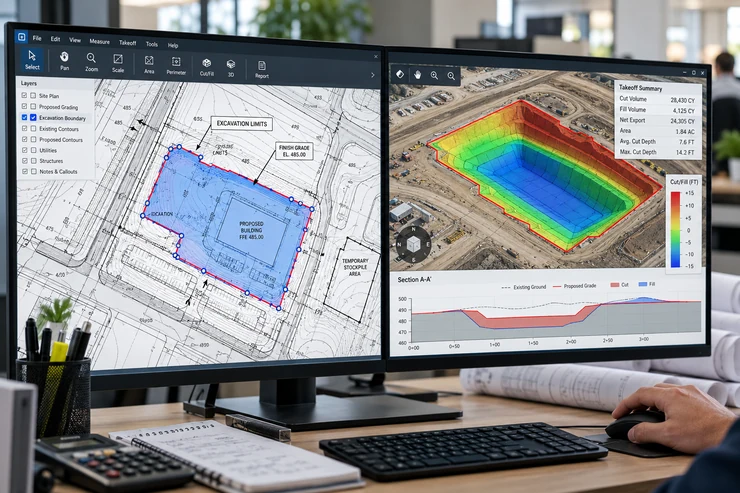
An estimator needs more than a grand total. The output should make it possible to review where the work occurs and explain how the quantities were produced.
For a grading job, that means seeing cut and fill separately. A site with 9,000 cubic yards of cut and 8,700 cubic yards of fill has a net difference of 300 cubic yards, but it still requires substantial excavation and placement. If a report shows only the net number, someone pricing equipment and labor may miss the scale of the operation.
A useful review also shows the drawing area or project section behind a quantity. When an estimate looks unusually high, the team should be able to trace it to the corresponding location and check the plans. The goal is a result that can be questioned and explained.
EarthWorksOS describes plan import, cut and fill calculation, 3D visualization, and reports as parts of its workflow. Those capabilities are most useful when the estimator checks the imported plans and the output against the bid scope, rather than treating the first calculation as final. www.excavationsoftware.net
Follow a Quantity Through One Worked Example
Imagine a contractor bidding the site preparation for a small commercial building. The first plan set shows a building pad, a parking area, and a slope along the eastern boundary. The estimator completes a takeoff and records 6,200 cubic yards of cut and 5,400 cubic yards of fill.
Two days later, an addendum raises part of the proposed parking grade and adjusts the eastern slope. The revised takeoff shows 5,900 cubic yards of cut and 5,750 cubic yards of fill.
These figures are illustrative, but they show why a revision needs more than a note saying “plans updated.” The cut quantity fell by 300 cubic yards, while the fill quantity rose by 350 cubic yards. The earlier net difference of 800 cubic yards has changed to 150 cubic yards. That change could affect the discussion about moving material around the site or bringing suitable material in.
The estimator should retain both versions, identify the addendum used for the revised result, and pass the changed quantities to the bid team. The earlier takeoff may still be useful for explaining the difference, but the team needs to know which numbers support the submitted bid.
Review the Material Assumptions Behind Cut and Fill
A measured cut volume is not automatically a supply of usable fill. Material may have to meet specifications for where it will be placed, and the required placed fill quantity may involve conditions that a simple subtraction does not describe.
For example, excavated material from one part of a site might be suitable for general grading but require further review before use beneath a building pad. The estimator should separate the measured quantity from any
assumption that the material can be reused. If soil information is limited, make that uncertainty visible to the bid team.
The Federal Highway Administration’s guidance on soil compaction explains the importance of compaction in constructed fills. The project’s geotechnical information and specifications should guide material and fill assumptions. Bridges & Structures
This is one reason to avoid describing a site as “balanced” based only on two similar numbers. A quantity comparison is valuable; a material plan requires additional information.
For a closer look at that distinction, EarthWorksOS has a separate article on site balance and haul considerations.
Keep Takeoff Review Separate From Bid Pricing
Accurate quantities are the starting point for pricing, but they do not determine the cost on their own. The team still needs to consider the type of material, how far it must move, site access, equipment, and the sequence of the work.
This separation makes reviews clearer. If the estimated price changes, the team can ask whether the quantity changed, a production assumption changed, or a unit cost changed. Without that distinction, it becomes difficult to explain a revised bid.
A good handover from takeoff to pricing includes the current drawing list, cut and fill quantities, the areas measured, and notes on unresolved scope or material questions. It should also identify any quantity that changed after an addendum.
EarthWorksOS’s article on turning cut and fill quantities into an estimate addresses the next stage, including cost factors beyond the measured volume. www.excavationsoftware.net
A Review Process for Every New Plan Revision
Revisions are easier to manage when the team follows the same sequence each time. You do not necessarily need to start the entire bid again. You do need to find out what changed and whether that change affects an existing measurement or assumption.
Start by reading the addendum and marking the affected sheets. Then compare the revised elevations, grading limits, or details with the version already measured. Recalculate the affected areas, review the new total, and record the difference. If the change has implications beyond the quantity, tell the person preparing the price.
Plan-based excavation takeoff software is valuable here because the estimator can work from a defined set of drawings and produce a revised quantity for review. The important habit is version control: the report must make clear which plan issue produced which result.
Before the bid is submitted, one person should check that the drawing register, takeoff report, and pricing sheet refer to the same revision. That final comparison can catch a change that was measured but never passed through to the bid.
How to Evaluate the Software on a Real Job
If your team is considering a takeoff tool, test it with a project you know. A finished job or a recently completed bid gives you drawings, previous quantities, and a basis for investigating differences.
Import the same plans your team actually receives. Check how easily an estimator can confirm scale and elevations, mark the work limits, calculate cut and fill, and review the output. Then make a small controlled change, such as using a revised grading sheet, and see whether the team can clearly identify the quantity difference.
The most useful question is not simply, “Did the software produce a number?” It is, “Can our estimator show another team member how this number came from these plans?”
The EarthWorksOS overview describes supported plan inputs and reporting features. A real project test is the way to see how those features fit your own bid process. www.excavationsoftware.net
If your team is moving away from manual measurement, its existing guide to adopting excavation takeoff software covers that broader change in workflow.
Frequently Asked Questions
Conclusion
The strongest takeoff is one the team can trace back to the plans. Plan-based excavation takeoff software helps produce and review quantities, but reliable bids still depend on selecting the correct drawings, checking the measurement area, understanding the material assumptions, and tracking changes.
Before a quantity reaches the pricing sheet, ask someone else on the team to follow it back to the relevant plan revision. If they can see where it came from and what remains uncertain, the takeoff is doing its job.