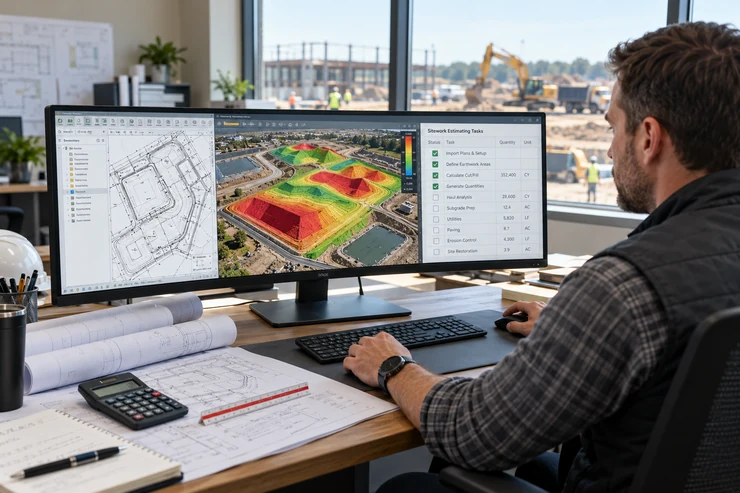
A sitework estimate can begin with one grading plan and quickly grow into several questions. How much material needs to be cut? Where is the fill needed? Has the proposed grade changed since the first drawing? Which quantities can the team confidently use when preparing its price?
Searching for sitework estimating software brings up products with different scopes. Some cover quantity takeoffs across several trades and create priced proposals. Others focus on earthwork measurements and reports that an estimator uses in a separate pricing process.
That distinction matters. Buying a tool without understanding where its work begins and ends can leave your team repeating steps in spreadsheets or assuming a quantity report is a complete bid. This guide focuses on the earthwork tasks worth testing before you choose software for a sitework estimating team.
Begin with the work your team actually bids
“Sitework” may include grading, excavation, paving, drainage, utilities, and other preparation work. Few contractors bid every part of that list in the
same way. Start by looking at your recent projects rather than a software feature comparison.
Which quantities take the most time to measure? Where do estimates most often need a second check? What type of drawing revisions arrive shortly before a deadline? These answers will tell you what the software must handle well.
For example, a contractor whose estimates depend heavily on grading quantities may place cut-and-fill calculations and surface review at the top of its list. A company preparing complete utility and paving proposals may need a broader system or several connected tools.
Competitor pages show why scope needs to be checked: AGTEK describes sitework, highway, paving, and pipe workflows , while STACK describes takeoff alongside cost estimates and proposals. Assess each product against the work your team needs to complete. agtek.com
Task 1: Import the plans you receive
The first test of sitework estimating software happens before any volume is calculated. Can your estimator work with the drawings sent by engineers, owners, and general contractors?
A project may arrive as a vector PDF, a scanned plan, a CAD file, or a combination. One file might contain clear contours; another may need manual interpretation. Confirm that a tool accepts the formats your team uses and lets the estimator review the imported information.
Do not test only a provider’s clean sample project. Choose a completed job with ordinary problems: a scanned sheet, an elevation that needs checking, or several plan revisions. Record any time spent converting or preparing the files before the takeoff starts.
The EarthWorksOS homepage describes PDF, TIFF, and AutoCAD plan imports. If your company needs another format, ask the product team to
confirm its exact support and show the workflow using your file. www.excavationsoftware.net
Task 2: Build surfaces you can inspect
Cut-and-fill calculations rely on comparing the ground as it exists with the proposed design. A missed contour, incorrect elevation, or unsuitable boundary can change the resulting quantities.
Ask your estimator to build the surfaces using a familiar plan. Can they see where the software obtained its elevations? Can they identify an area that appears too high or low? Can they correct an input and review the effect?
The objective is not merely to generate a 3D image. The model should help a person check whether the site has been represented properly. If the result shows an unexpectedly deep cut, your team should be able to investigate its location and source information.
Autodesk’s material calculation tutorials describe earthwork volume reporting through comparisons of existing and proposed surfaces. That underlying question applies regardless of which tool a contractor evaluates: can you understand what is being compared? help.autodesk.com
Task 3: Review cut and fill as separate quantities
A net balance can make a project look simple. If cut and fill are close, it may appear that little material movement is required. Yet the volumes can sit in different locations, involve different materials, or require different treatment.
Ask the software to show cut and fill clearly. Can your team locate the main areas? Can it examine sections or visual outputs when a number looks unusual? A single net figure may be useful as a summary, but it should not hide information needed for planning and pricing.
EarthWorksOS describes cut-and-fill volume calculations and 3D visualisation on its product page. During a trial, compare its output with a project your estimator has already completed. Examine differences before relying on either result. www.excavationsoftware.net
This is a key reason to evaluate sitework estimating software with your own plans. A demonstration can show that a button works; a familiar project shows whether the results are useful to your team.
Task 4: Check material assumptions before pricing
Cut and fill are quantities, not automatic statements about what can be reused on site. Stripping, unsuitable material, compaction requirements, and changes in material volume can affect an earthwork plan.
Ask what the tool represents directly and what the estimator must account for elsewhere. Can your team record the assumptions behind a quantity? If new ground information arrives, can it return to the takeoff and explain what needs to change?
The Federal Highway Administration discusses shrink and swell factors in earthwork quantity planning. Appropriate factors depend on the materials and project information. Software can calculate from the inputs supplied, but it cannot confirm an unknown site condition. highways.fhwa.dot.gov
A useful sitework estimate makes its assumptions visible. When comparing tools, look for a workflow that helps your estimator keep the quantity review separate from judgments about material handling and price.
Task 5: Handle a revised grading plan
A sitework estimate rarely stays with the first drawing set. A proposed elevation changes, a building pad moves, or the owner issues a revised plan near the bid deadline.
During a product trial, make one realistic revision to your test project. Measure how long it takes to update the affected area and generate new quantities. Can the estimator tell which drawing revision was used? Can they explain why the cut or fill total changed?
A fast first takeoff has less value if every small revision forces the team to start over. On the other hand, an easy update still needs to be checked. The revised result should be understandable to the person reviewing the bid.
Revision handling deserves its own place on your sitework estimating software checklist because it reflects how projects actually move through preconstruction.
Task 6: Produce a report someone else can use
The person who builds a takeoff knows what went into it. The project manager reviewing the bid may not. Give the report to someone who did not use the software and ask them what they can understand without an explanation.
Can they identify the project and drawing version? Are the units and cut-and-fill results clear? Can they find the areas responsible for a large quantity? Is there room to explain exclusions or assumptions outside the software output?
EarthWorksOS describes reporting with graphical analysis, cross-sections, and annotated drawings. Its gallery provides a starting point for looking at visual output. A report made from your own project is the better test of whether it fits your review and client communication needs. www.excavationsoftware.net
A report does not need to replace every document in your bid package. It does need to help your team check and communicate the earthwork quantities it produces.
Task 7: Move quantities into the pricing process
This is where software categories can become confusing. A sitework estimator may use calculated quantities to price excavation, equipment, labour, hauling, and other work. Not every tool performs all those steps.
Ask the provider to demonstrate what happens after the volume report. Does the product calculate prices using your rates? Does it export quantities for another system? Will your estimator copy numbers into a spreadsheet? How will a plan revision affect the price calculation?
Do not treat “helps with bidding” as a promise that software produces a finished, priced proposal. An accurate quantity can support a better bid, but the cost of doing the work still depends on site conditions and the contractor’s approach.
The article on turning cut-and-fill volumes into a price explains the distinction for EarthWorksOS. Use that information to decide how it would fit into your existing estimating process, rather than assuming it replaces every pricing step. www.excavationsoftware.net
Task 8: Train the people who will use it
Your most experienced estimator may learn a new tool quickly. The next person hired into the team might need clearer guidance. Training and support should therefore be part of the purchase decision.
Have the people who will perform and review takeoffs try the tool. Notice which steps require help. Ask what learning materials are available and how users can reach support when an unusual plan arrives during a live bid.
You can use the site’s earthwork estimating software scorecard to assess compatibility, report quality, learnability, and support. Give each factor a weight based on your company’s work rather than treating every feature as equally important. www.excavationsoftware.net
Good sitework estimating software should help the team complete its regular work consistently. A powerful capability that nobody can apply confidently will do little for the next bid deadline.
A practical test before you choose
Take one completed project and ask your estimator to work through these steps:
- Import the original plans in their usual formats.
- Build and check the existing and proposed surfaces.
- Examine cut, fill, and an unusual quantity.
- Apply one realistic drawing revision.
- Produce a report for another team member to review.
- Identify which quantities move into a separate pricing process.
- Record the time from plan preparation to checked output.
EarthWorksOS offers a 14-day trial request. If it is on your shortlist, use your own project during the trial and ask direct questions about any step the team cannot complete. www.excavationsoftware.net
Frequently Asked Questions
Conclusion
The right sitework estimating software depends on the work your company needs to finish. If earthwork quantities are central to your bids, test plan import, surface review, cut and fill, revisions, and reports with a real project. Then check how those outputs enter your pricing process.
That exercise will show where EarthWorksOS can support your estimators and which tasks still need another tool or your team’s judgment.